
Understanding the DOM, Virtual DOM, rendering, reconciliation, and React UI updates
Introduction
React has changed the way developers build user interfaces by introducing a declarative approach to UI development. Instead of manually finding HTML elements and telling the browser exactly how to update them, developers describe what the interface should look like based on the current application state. React then takes responsibility for managing the changes required to bring the user interface up to date.
For a small application, manually updating the DOM may not seem difficult. However, modern applications can contain hundreds or thousands of elements, multiple components, dynamic lists, forms, animations, dashboards, and frequently changing data. Managing every DOM update manually can make the code harder to maintain and easier to break.
This is where one of the most commonly discussed React concepts comes in: the Virtual DOM. You may have heard statements such as “React is fast because it uses the Virtual DOM” or “React does not update the real DOM.” These statements are useful as simplified explanations, but they do not tell the complete story.
The Virtual DOM is better understood as part of React's rendering and reconciliation model. When application data changes, React determines what the UI should look like after the change. It then compares the new rendered result with the previous result and determines what needs to be committed to the browser DOM.
Understanding this process is valuable for frontend developers because it explains what happens behind the scenes when a React component re-renders. It also helps explain related concepts such as reconciliation, keys in lists, component rendering, state updates, and performance optimization.
In this article, we will start with the browser DOM, understand why React needs a rendering model, explore what the Virtual DOM means, and then walk through what happens from a state change to the final UI update. The goal is not just to memorize the term “Virtual DOM,” but to build a practical mental model of how React updates the interface.
What Is the DOM?
DOM stands for Document Object Model. When a browser loads an HTML document, it creates an in-memory representation of that document as a tree of nodes. Elements, attributes, and text become part of this structure, allowing JavaScript and browser APIs to interact with the page.
For example, an HTML page containing a heading and paragraph can be thought of as a tree in which the parent element contains child elements. When JavaScript changes a DOM node, the browser can reflect that change in the rendered page.
The DOM is therefore not just the HTML source code sent by the server. It is the browser's live representation of the document. Developers can use APIs such as querySelector, classList, textContent, and createElement to interact with it.
Why Can Direct DOM Manipulation Become Difficult?
Direct DOM manipulation is not inherently bad. In many situations, it is completely appropriate. The challenge appears when an application has a large number of independent pieces of UI that depend on changing data.
Imagine a dashboard containing navigation, filters, charts, tables, notifications, user information, and live statistics. When data changes, the application needs to keep the visible interface synchronized with that data. If developers manually manage every DOM update, they also have to keep track of what was previously displayed, what changed, which elements depend on that data, and which updates need to happen together.
React approaches this problem differently. Developers describe the desired UI as a function of application state, while React manages the process of determining the necessary UI updates.
What Is the Virtual DOM?
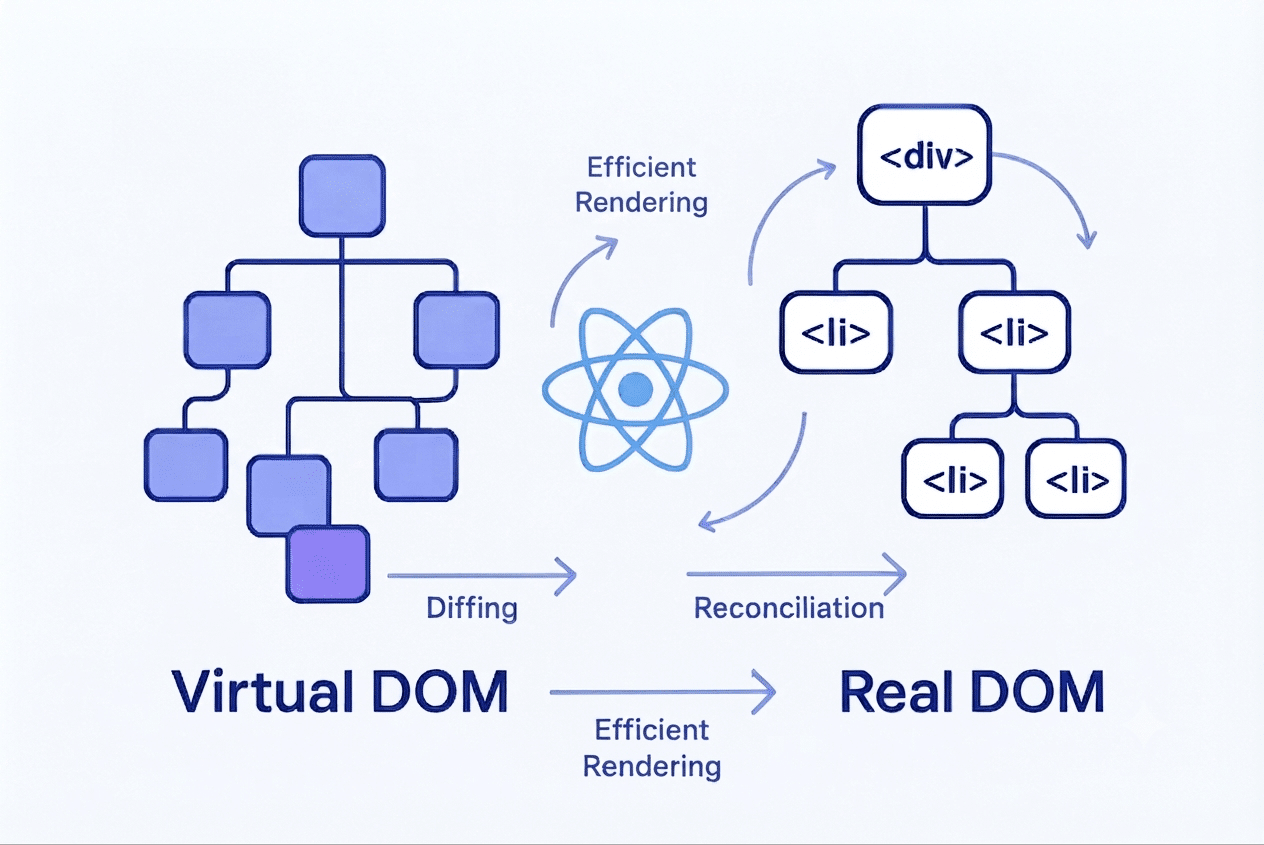
The Virtual DOM is an in-memory representation of the UI that React works with during its rendering process. It is not the browser's actual DOM, and it is not a second copy of the webpage that the browser renders.
A useful way to think about it is as an intermediate representation of what the UI should look like. React creates React elements as components render, and React's internal rendering system uses these structures to determine how the UI should be updated.
The important point is that developers normally do not need to create or manipulate the Virtual DOM themselves. You write components and JSX, update state or props, and React manages the rendering and reconciliation process.
Why Does React Use This Approach?
The main benefit is the declarative programming model. Instead of writing a sequence of instructions describing every UI change, a React component describes the UI that should exist for the current state.
For example, if a counter is zero, the component describes a UI showing zero. When the state becomes one, the component describes a UI showing one. React is responsible for determining how to move from the previous rendered result to the new one.
This separation makes application code easier to reason about. The developer focuses more on what the interface should represent, while React handles the mechanics of updating the browser DOM.
What Happens When a React Component Renders?
A React component can render again when its state changes, when its parent causes it to render, or when relevant props change. A render means React evaluates the component and produces a new description of the UI.
It is important to distinguish a component render from a DOM update. A component rendering again does not mean that React throws away every existing DOM node and recreates the entire page. Rendering produces a new result that React can reconcile with the previous result.
This distinction is one of the most important concepts to understand when learning React. A render is part of React's calculation of the UI, while committing changes is the stage where the necessary effects are applied to the browser DOM.
What Is Reconciliation?
Reconciliation is the process React uses to determine how the newly rendered UI relates to the previous rendered UI. React looks at the structures involved and determines which changes need to be committed.
This comparison is not simply a generic deep comparison of every JavaScript value. React uses rules and information such as element types, component structure, and keys for lists to determine how the new tree relates to the previous one.
The result of reconciliation is used to determine the work that needs to be committed. This is why reconciliation is closely related to discussions about the Virtual DOM, even though the two terms are not interchangeable.
A simple mental model is: state changes, React renders, React reconciles the new result with the previous result, and React commits the required changes to the browser DOM.
Virtual DOM Does Not Replace the Real DOM
One of the most common misunderstandings is that React uses the Virtual DOM instead of the real DOM. That is not accurate. The browser still needs the actual DOM to display and interact with the webpage.
The Virtual DOM should instead be understood as part of React's UI rendering process. React uses its rendered representation and reconciliation process to determine what needs to happen to the actual DOM.
A more accurate flow is: React component and state produce a rendered UI representation; React reconciles that result with the previous one; React commits the necessary changes; and the browser displays the updated DOM.
A Simple Conceptual Example
Consider a component that displays a user's name. Initially, the state contains one name. Later, an event changes that state to another name.
After the state update, React renders the component again. The new rendered result contains the new name. During reconciliation, React can determine that the relevant text has changed while the surrounding structure may remain the same.
The important lesson is that the developer does not need to manually find the heading, remove its previous text, create new text, and insert it. The developer changes the application state, and React manages the UI update process.
Why Are Keys Important in React Lists?
Keys are especially important when React renders lists. A key gives React a stable identity for an item so that it can understand how items in the new list correspond to items from the previous render.
Imagine a list of users where one user is removed or two users change positions. Without stable identities, React has less information about which item corresponds to which previous item. Stable keys make the relationship clearer.
For this reason, a unique identifier associated with the data is generally preferable to using the array index as the key. Index keys can cause unexpected behavior when list items are inserted, removed, or reordered.
- 1. Use a stable, unique identifier when the data provides one.
- 2. Do not treat keys as ordinary props; React uses them for its own list reconciliation.
- 3. Avoid using array indexes as keys when the list can change order or membership.
Does the Virtual DOM Make React Faster?
It is tempting to summarize the Virtual DOM by saying that it makes React faster than the DOM. That statement is too broad. Performance depends on the entire rendering process, the complexity of the UI, the amount of work done during rendering, component structure, state placement, browser behavior, and many other factors.
The value of React's model is that it provides a structured way to determine UI changes without requiring developers to manually coordinate every DOM operation. This can make complex interfaces easier to maintain while allowing React to optimize its update work.
Developers should therefore avoid thinking of the Virtual DOM as a magic performance layer. A poorly structured component can still perform unnecessary rendering work, and a simple direct DOM operation can sometimes be perfectly efficient.
Re-rendering Does Not Mean Recreating the Entire DOM
Another common misconception is that whenever a React component re-renders, React recreates all of the corresponding DOM elements. A re-render means React produces a new UI result. React then reconciles that result and determines what needs to be committed.
This distinction is especially important when debugging performance. If a component renders more often than expected, the first question is not necessarily whether the browser is rebuilding the entire page. Instead, developers should understand which components are rendering, why they are rendering, and how much work those renders perform.
From State Change to Updated UI
A simplified way to understand a React update is to think of it as a sequence of stages.
- A state or prop value changes.
- React schedules the relevant update.
- The affected component renders again and produces a new UI description.
- React reconciles the new result with the previous rendered result.
- React determines the necessary work for the commit.
- The required changes are committed to the browser DOM.
- The browser displays the updated interface.
This model is intentionally simplified, because React's modern rendering architecture can schedule and process work in more sophisticated ways. However, it provides a useful foundation for understanding the relationship between rendering, reconciliation, and DOM updates.
How This Connects to React Performance
Once developers understand that rendering and DOM updates are different stages, several React performance concepts become easier to understand.
- Keeping state close to the components that need it can reduce unnecessary rendering work.
- Good component boundaries can make UI updates easier to reason about.
- Stable keys are important for predictable list reconciliation.
- React.memo can prevent some unnecessary child renders when its conditions are appropriate.
- useMemo and useCallback can sometimes avoid repeated calculations or preserve references, but they should be used based on an actual need rather than automatically.
- Expensive calculations inside rendering should be considered carefully because rendering can happen more than once.
Performance optimization should therefore start with understanding the actual rendering behavior of an application rather than assuming that the Virtual DOM automatically solves every performance problem.
React Rendering: Common Mix-Ups, Explained Simply
1. Virtual DOM Isn't Always the Fastest Option
The Virtual DOM is just a trick React uses to speed things up in most cases, not a magic rule that makes everything faster. Sometimes, touching the real page directly can actually be quicker.
2. React Still Has to Update the Real Page
React doesn't avoid the real DOM completely — it still has to make changes to it eventually. That's the only way the browser can actually show anything on screen.
3. Updating State Doesn't Rebuild the Whole Page
When you update state, only the parts that changed get re-rendered, not the entire page. React figures out what's different and only updates that.
4. "Re-rendering" and "Updating the Page" Are Two Different Things
Re-rendering just means React is recalculating what a component should look like. It doesn't always mean something on the actual page changes — sometimes the result comes out the same.
5. React Compares Old vs New Virtual Copies, Not the Real Page
Before touching the real page, React compares the old version and new version of its Virtual DOM (both just stored in memory) to see what changed. Only after that comparison does it update the real page — and only the parts that need it.
A Simple Real-World Analogy
Imagine you are editing a large document. Instead of printing the entire document again every time one sentence changes, you keep track of the new version and determine which parts need to be updated.
React's process is more sophisticated than this analogy, but the idea is useful: the application state describes the desired result, React calculates the new UI result, reconciliation determines how it relates to the previous result, and the necessary changes are committed to the actual interface.
This analogy also explains why the Virtual DOM should not be described simply as a faster version of the browser DOM. Its role is connected to React's declarative rendering model and update strategy.
What Developers Should Focus On
As a React developer, you normally do not need to manually manage the Virtual DOM. Your responsibility is to build components that clearly represent application state and user interactions.
- Keep component responsibilities clear.
- Use stable keys for dynamic lists.
- Keep state at an appropriate level.
- Avoid unnecessary work during rendering.
- Understand why components render instead of assuming every render is a DOM replacement.
- Measure performance before introducing optimization techniques.
Understanding the Virtual DOM is valuable not because developers need to manipulate it directly, but because it gives them a better mental model of what React is doing behind the scenes.
A Simple Mental Model to Remember
If you remember only one flow from this article, remember this:
State changes → Render → Reconcile → Commit → Updated UI
State changes provide the new data. Rendering produces the UI that corresponds to that data. Reconciliation determines how the new result relates to the previous result. The commit phase applies the necessary changes to the browser DOM. The browser then displays the updated interface.
Final Thoughts
The Virtual DOM is an important concept for understanding how React manages UI updates, but it is only one part of the larger React rendering model. The most useful way to understand it is to connect it with rendering and reconciliation rather than treating it as a standalone performance feature.
When state or props change, React can render the component again and produce a new representation of the desired UI. React then reconciles that result with the previous rendered result and commits the necessary changes to the actual DOM.
This approach allows developers to work with a declarative UI model instead of manually coordinating every DOM operation. It also explains why concepts such as stable keys, component boundaries, state placement, and rendering performance matter in real React applications.
Key takeaway: You describe what the UI should look like based on application state, and React manages the process of bringing the browser DOM in line with that description.