
Introduction
Turning a Figma design into a working frontend application has traditionally required a lot of manual work.
A designer creates the interface in Figma, and then the developer studies the design, checks spacing, identifies colors and typography, downloads assets, understands component states, and finally translates everything into HTML, CSS, JavaScript, React, or another frontend technology.
The process works, but it can become time-consuming when applications contain many screens and reusable components.
This is where Figma MCP enters the picture.
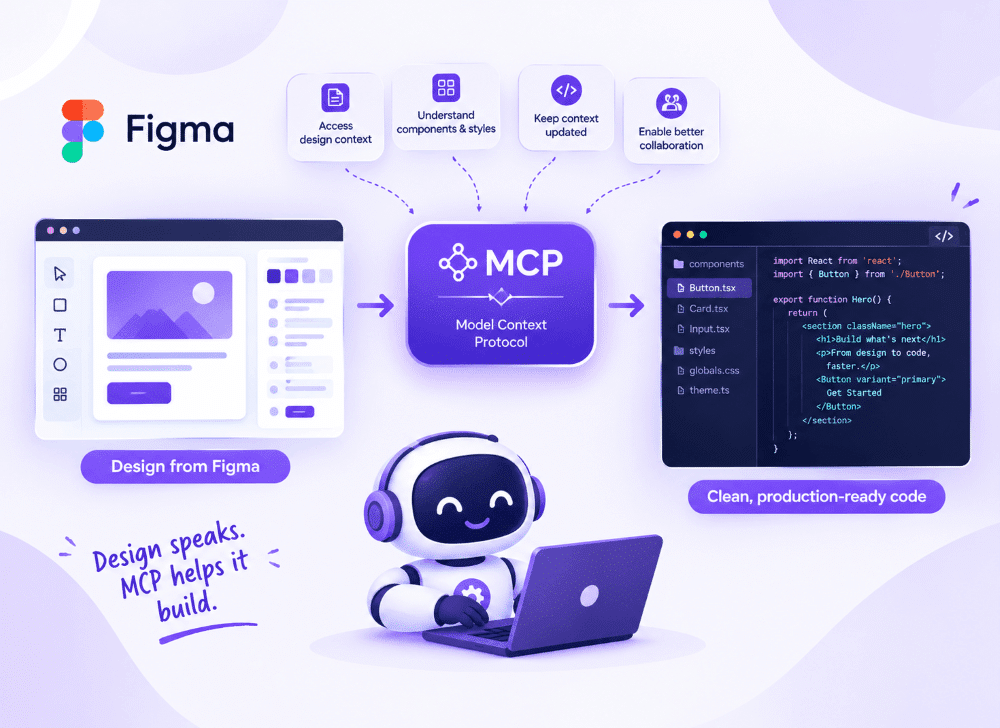
Figma MCP brings Figma design context into AI-assisted development workflows through the Model Context Protocol (MCP). Instead of asking an AI coding tool to recreate an interface from a screenshot or manually explaining every design detail, developers can provide structured design context that helps the AI understand the original Figma design.
For frontend teams, this creates an interesting connection between design systems, Figma, AI tools, and application code.
In this article, we'll explore what Figma MCP is, how it works, how it can be used with React, its benefits and limitations, and how it can fit into a modern frontend development workflow.
What Is MCP?
MCP stands for Model Context Protocol.
It is a protocol designed to allow AI applications to interact with external tools and sources of information in a structured way.
An AI coding assistant normally has access to the conversation and the code provided to it. MCP can extend that capability by allowing the AI application to interact with external systems that expose information through MCP.
For example, an AI development tool could potentially work with information from:
- Design tools
- Documentation systems
- Databases
- Project management tools
- Development environments
- APIs
- Internal company systems
The important idea is that the AI doesn't have to rely only on information manually copied into the conversation.
Instead, an MCP-compatible tool can provide relevant context directly to the AI workflow.
What Is Figma MCP?
Figma MCP connects Figma design information with AI-assisted development workflows using the Model Context Protocol.
The exact capabilities depend on the Figma MCP implementation and the AI client being used, but the overall idea is straightforward:
Figma Design → Figma MCP → AI Coding Assistant → React / Next.js Code → Developer Review → Production Application
Instead of manually describing a Figma design to an AI assistant, the developer can provide the relevant Figma context through the supported MCP workflow.
This can help the AI understand aspects of the design such as:
- Layout structure
- Components
- Text
- Colors
- Typography
- Spacing
- Design properties
- Assets
- Component relationships
The goal isn't simply to generate code automatically.
The bigger opportunity is to reduce the amount of repetitive work involved in transferring design information from Figma into development.

Why Is Figma MCP Important for Frontend Development?
A typical design-to-development workflow contains several translation steps.
Designer → Figma Design → Developer interprets design → Developer writes code → Browser implementation → Compare with Figma → Make corrections
Every translation step can introduce differences.
For example, a developer might accidentally use padding: 20px when the design uses padding: 24px.
The difference may seem small, but repeated across dozens of components, these inconsistencies can make a product feel visually inconsistent.
Figma MCP can help reduce some of this manual interpretation by making design context more accessible to AI-powered development tools.
However, it is important to understand that MCP doesn't eliminate the developer's responsibility.
Developers still need to make architectural decisions, review generated code, handle business logic, test responsive behavior, and ensure accessibility.
How Does Figma MCP Work?
At a high level, the workflow consists of several parts.
1. Designer creates the interface
The designer builds the interface in Figma using frames, components, styles, variables, and assets.
Example:
					Example:
 Dashboard
 ├── Header
 ├── Navigation
 ├── Statistics Cards
 ├── Chart
 └── Recent Transactions
2. Figma provides design context
The Figma MCP integration makes relevant design information available to the AI development environment.
The AI can then use that information as part of its context.
3. Developer provides implementation instructions
The developer can give additional instructions such as:
“Build this dashboard using React and TypeScript. Reuse our existing Button, Card, and Tabs components.”
This is important because the developer still controls how the design should be implemented within the existing application architecture.
4. AI generates or modifies code
The AI can use the available design context and developer instructions to generate or modify frontend code.
5. Developer reviews the result
The developer checks:
- Component structure
- Responsive behavior
- Accessibility
- Existing coding standards
- Performance
- Business logic
- Design accuracy
The final implementation should still go through normal development and testing processes.
Figma MCP and React: A Practical Example
Let's consider a simple Figma design for a product card.
The design contains:
					Product Card
 ├── Product Image
 ├── Product Name
 ├── Description
 ├── Price
 └── Buy Now Button
A traditional workflow might require the developer to manually inspect the Figma file and then create the component.
With an AI-assisted Figma MCP workflow, the developer can provide the design context and ask the coding assistant to create a reusable React component.
Example React component:
Figma MCP and Existing Design Systems
One of the most valuable use cases for Figma MCP is working with an existing design system.
Imagine a company already has reusable components:
					components/
 ├── Button/
 ├── Card/
 ├── Input/
 ├── Checkbox/
 ├── Radio/
 ├── Tabs/
 └── Tag/
Instead of generating completely new components for every Figma screen, developers can instruct the AI:
“Use the existing Button, Card, Tabs, and Tag components whenever they match the Figma design. Do not create duplicate components.”
This distinction is extremely important.
Without this instruction, an AI tool may create ProductCardButton, DashboardButton, ProfileButton, and CheckoutButton even though the project already has a reusable Button component.
A good AI-assisted workflow should therefore combine Figma context with codebase context.
The goal should be:
Figma Design + Existing Design System + Project Architecture → AI-Assisted Implementation
rather than simply:
Figma → Generate Random Code
Figma MCP and Storybook
Figma MCP can also fit naturally into a Storybook-based component development workflow.
Suppose your team maintains components in Storybook.
A designer creates a new interface using existing Figma components.
The developer can use the design context to understand how those components are expected to appear and then implement or update the corresponding Storybook component.
For example:
Figma → Button Design → React Button → Storybook
Storybook can document component states such as:
- Primary
- Secondary
- Disabled
- Small
- Large
This can make the relationship between the design system and development system more visible.
It can also encourage teams to think about component states instead of implementing only the exact appearance shown in one screen.
For example, a Figma button might show only its default state, but the actual React component may need:
- Default
- Hover
- Focus
- Active
- Disabled
- Loading
A developer still needs to identify these requirements because visual design context alone may not communicate the complete behavior.
Benefits of Using Figma MCP
1. Faster Design-to-Code Workflow
Developers can spend less time manually transferring design details into an AI prompt. This can make initial implementation and prototyping faster.
2. Better Design Context
Instead of providing only a screenshot, the AI can work with richer information from the design workflow. This can help it understand the structure behind the interface.
3. Less Repetitive Work
Tasks such as identifying UI structures and translating repeated visual patterns into components can become less manual.
4. Better Collaboration Between Designers and Developers
Figma remains the design source while the development environment remains the implementation source. MCP provides a bridge between these environments.
5. Better Use of Existing Components
When combined with repository and design-system context, AI can be instructed to reuse existing components instead of creating everything from scratch.
What Figma MCP Cannot Replace
Figma MCP is powerful, but it doesn't replace frontend developers.
There are several things that still require human judgment.
Business Logic
A Figma design can show a checkout button, but it doesn't explain the complete payment workflow.
Application Architecture
The design doesn't tell you whether the application should use Context API, Redux, Zustand, Server Components, Client Components, REST APIs, or GraphQL. These are engineering decisions.
Responsive Behavior
A desktop design doesn't always explain exactly how the interface should behave at every breakpoint. Developers still need to determine how layouts should adapt across desktop, tablet, and mobile.
Accessibility
Visual design alone doesn't guarantee an accessible application.
Developers still need to consider:
- Semantic HTML
- Keyboard navigation
- Focus states
- Screen readers
- ARIA where appropriate
- Color contrast
- Error messaging
This model is intentionally simplified, because React's modern rendering architecture can schedule and process work in more sophisticated ways. However, it provides a useful foundation for understanding the relationship between rendering, reconciliation, and DOM updates.
Code Quality
Generated code still needs review.
Developers should check:
- Maintainability
- Reusability
- Performance
- Security
- Type safety
- Naming conventions
- Project architecture
Figma MCP vs Traditional Design-to-Code Workflow
The biggest difference isn't that developers suddenly stop writing code.
Instead, the workflow changes.
Traditional Workflow:
Traditional Workflow:
Figma → Manual inspection → Developer interpretation → Code → Visual comparison → Corrections
AI-Assisted MCP Workflow:
Figma → Design context → AI coding assistant → Existing codebase + design system → Initial implementation → Developer review → Testing and refinement
The developer remains an important part of the process.
The difference is that AI can take on more of the repetitive translation work.
Challenges and Limitations
Figma MCP should not be treated as a magic solution for generating complete production applications.
One major challenge is design ambiguity.
A visual design may show what something looks like but not explain why it behaves that way.
For example, a Figma screen may show a navigation menu, but it may not specify:
- What happens when an item is clicked?
- What happens on mobile?
- What happens when the user doesn't have permission?
- What happens when an API request fails?
- What happens when content is longer than expected?
These decisions require product and engineering context.
Another challenge is maintaining consistency between Figma and the codebase.
If the Figma design system and development component library evolve separately, AI-assisted implementation can still produce inconsistent results.
This means good design systems and good engineering practices remain important even when AI is involved.
The Future of Design-to-Code Development
Imagine you are editing a large document. Instead of printing the entire document again every time one sentence changes, you keep track of the new version and determine which parts need to be updated.
React's process is more sophisticated than this analogy, but the idea is useful: the application state describes the desired result, React calculates the new UI result, reconciliation determines how it relates to the previous result, and the necessary changes are committed to the actual interface.
This analogy also explains why the Virtual DOM should not be described simply as a faster version of the browser DOM. Its role is connected to React's declarative rendering model and update strategy.
What Developers Should Focus On
As a React developer, you normally do not need to manually manage the Virtual DOM. Your responsibility is to build components that clearly represent application state and user interactions.
- Keep component responsibilities clear.
- Use stable keys for dynamic lists.
- Keep state at an appropriate level.
- Avoid unnecessary work during rendering.
- Understand why components render instead of assuming every render is a DOM replacement.
- Measure performance before introducing optimization techniques.
Understanding the Virtual DOM is valuable not because developers need to manipulate it directly, but because it gives them a better mental model of what React is doing behind the scenes.
The Future of Design-to-Code Development
The traditional boundary between design and development is gradually becoming more connected.
Design tools can provide structured information.
AI tools can understand and transform that information.
Development environments can provide project context.
Design systems can provide reusable building blocks.
Together, these capabilities create a workflow where:
Design → Context → AI → Code → Developer Review → Production
This doesn't mean designers will become developers or developers will become designers.
Instead, both roles can potentially spend less time on repetitive translation work and more time on product decisions, user experience, engineering quality, and problem solving.
Conclusion
Figma MCP represents an important step toward connecting design tools with AI-assisted software development.
By making Figma design context available within supported AI development workflows, it can help developers reduce repetitive design inspection and accelerate the initial implementation of interfaces.
The biggest value comes when Figma MCP is combined with an existing development ecosystem:
Figma + Design System + React + Storybook + Codebase Context + AI
However, Figma MCP should be viewed as a development accelerator rather than a replacement for frontend engineering.
Developers still need to make architectural decisions, build business logic, ensure accessibility, handle responsive behavior, test applications, and review generated code.
The future of design-to-code is therefore not simply about automatically converting pixels into code. It is about creating a more connected workflow where designers, developers, design systems, and AI can work with the same context.